Life Guardian vs Life360: Privacy, Price and Features Compared
An honest UK comparison of Life Guardian 24/7 and Life360: what each costs, how they handle your family's data, and which one suits your family.
Short answer: Life360 is the bigger, more established app, with a generous free plan and paid tiers that add services like breakdown assistance and emergency dispatch. Life Guardian 24/7 is a newer, simpler app with one paid plan, no ads and a firm promise not to sell your data, and it is built for every generation in a family, including older parents. If you want the widest set of extras, Life360 is hard to beat. If privacy and a single straightforward price matter most, Life Guardian is the better fit.
We make Life Guardian, so we’ve tried to be fair: every Life360 detail below links to its source and shows the date we checked it. If anything has changed, please tell us at lifeguardiansupport@gmail.com and we’ll update this page.
At a glance
| Life Guardian 24/7 | Life360 (UK) | |
|---|---|---|
| Price | Free to join a Circle. Premium £4.99/month or £49.99/year to create Circles | Free plan, or Silver £6.99, Gold £9.99, Platinum £19.99 |
| Who pays | Only the person who creates the Circle | Paid plan features cover everyone in the Circle |
| Free to create a group | No: creating a Circle needs Premium | Yes |
| Ads | None | In-app advertising platform launched in the US in 2024 |
| Selling data | Does not sell personal data | Stopped selling precise location data in 2022, still shares some data with partners (see below) |
| Location history | Location history and recent journeys | 2 days free, 7 days Silver, 30 days Gold and Platinum |
| Place alerts | Safe Places with arrival and departure alerts | 2 places free, 5 on Silver, unlimited on Gold and Platinum |
| SOS | Press-and-hold SOS to your Circle on every account | SOS Help Alert on every plan; emergency dispatch on Gold and Platinum |
| Extras | Circle chat, voice notes, audio and video calls, Quick Notes, consent-only Live Listen | Breakdown assistance, ID theft protection, stolen phone cover and pet features on higher tiers |
| Devices | iPhone and Android | iPhone and Android |
Life360 details checked on 30 October 2026 on Life360’s UK pricing page.
Price: what a family actually pays
Life Guardian has one paid plan. It is free to download and free to join a Circle you’ve been invited to. To create a Circle and invite your family, one person needs Premium, which costs £4.99 a month or £49.99 a year in the UK. That one subscription covers every Circle the account creates, so children, a partner or grandparents you invite never pay. New subscribers may be eligible for a 7-day free trial, which the app shows before you pay.
Life360 has a free plan and three paid tiers. On its UK page they are listed at £6.99 (Silver), £9.99 (Gold) and £19.99 (Platinum), with a saving of 31% if you pay annually. Life360 says paid features cover everyone in your Circle, so its family maths is similar: one person pays and everyone benefits.
So which is cheaper? Life Guardian’s single plan costs less than any of Life360’s paid tiers. But Life360’s free plan lets you create a Circle and share locations without paying anything, which Life Guardian does not. If you only need basic location sharing and two place alerts, Life360 Free costs nothing. If you want unlimited place alerts and longer history, compare Life Guardian’s £4.99 with Life360 Gold at £9.99.
Privacy: ads and your family’s data
This is the biggest difference between the two apps.
Life Guardian shows no ads and does not sell personal data. Location is shared only with the members of each Circle, and only while sharing is turned on. You can switch location sharing off for any Circle, and Live Listen only works for members who have turned it on themselves. Our privacy policy lists every service that processes data for us and why.
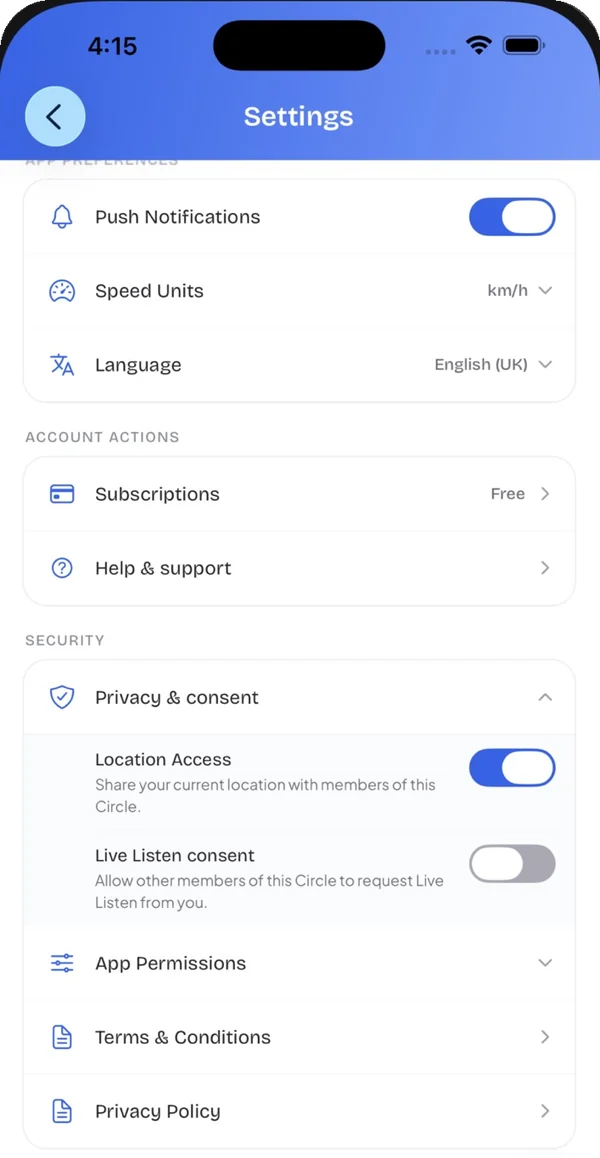 Privacy and consent settings in Life Guardian: location sharing per Circle, and Live Listen off unless the member turns it on.
Life360 has a more complicated history. In December 2021, The Markup reported that Life360 was selling precise location data to data brokers. In January 2022, Life360 said it would stop selling precise location data, keeping one partnership with Allstate’s Arity for driving features and continuing to sell aggregated data to Placer.ai.
In September 2024, Life360 launched an advertising platform for its US audience, with ads shown both in the app and elsewhere. In June 2025 it added Place Ads, brand messages triggered by members’ real-world movements, such as arriving at a shopping centre. We couldn’t confirm whether UK members see these ads, so check the app and Life360’s current privacy policy before you decide.
Safe Places and arrival alerts
Both apps let you set places and get notified when someone arrives or leaves.
In Life Guardian, you add Safe Places such as Home, School, Work or Grandparents, choose a category and set the alert radius on the map. Your Circle gets arrival and departure alerts, and you can see recent visits to each place.
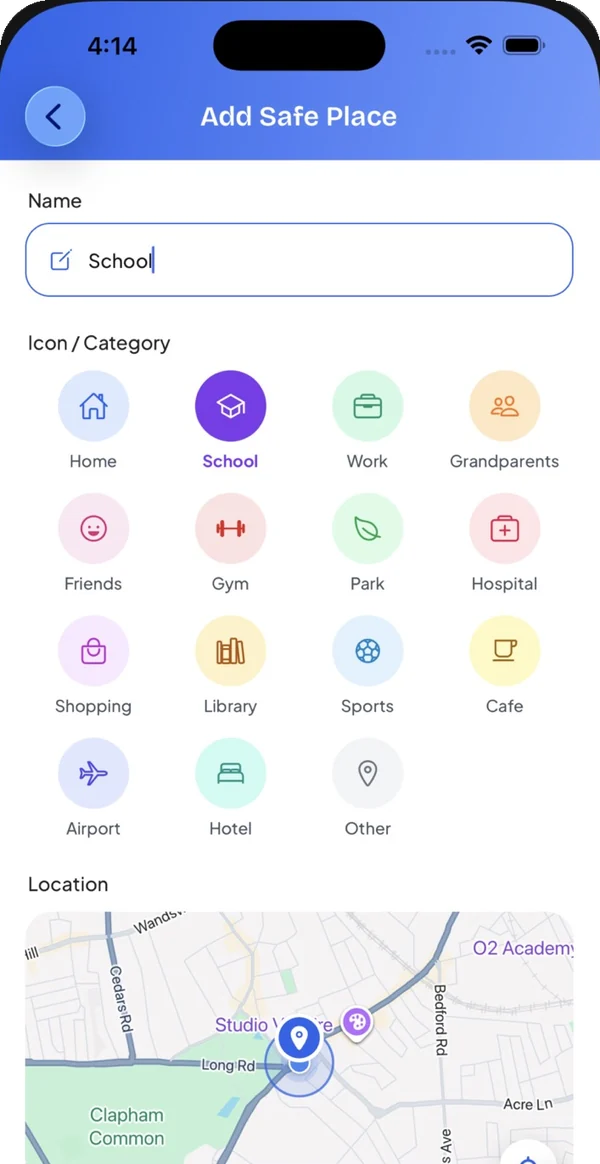 Adding a Safe Place in Life Guardian. Categories include Home, School, Work and Grandparents.
Life360 limits place alerts by plan: 2 on Free, 5 on Silver, and unlimited on Gold and Platinum. If your family needs alerts for home, two schools, a club and grandparents’ house, you’d need Gold.
SOS and emergencies
Life Guardian has an SOS button one tap away in the bottom bar. You press and hold it, a 3-second countdown starts, and you can slide to cancel if it was a mistake. If you don’t cancel, everyone in your active Circle is alerted with your location. SOS is never behind the paywall.
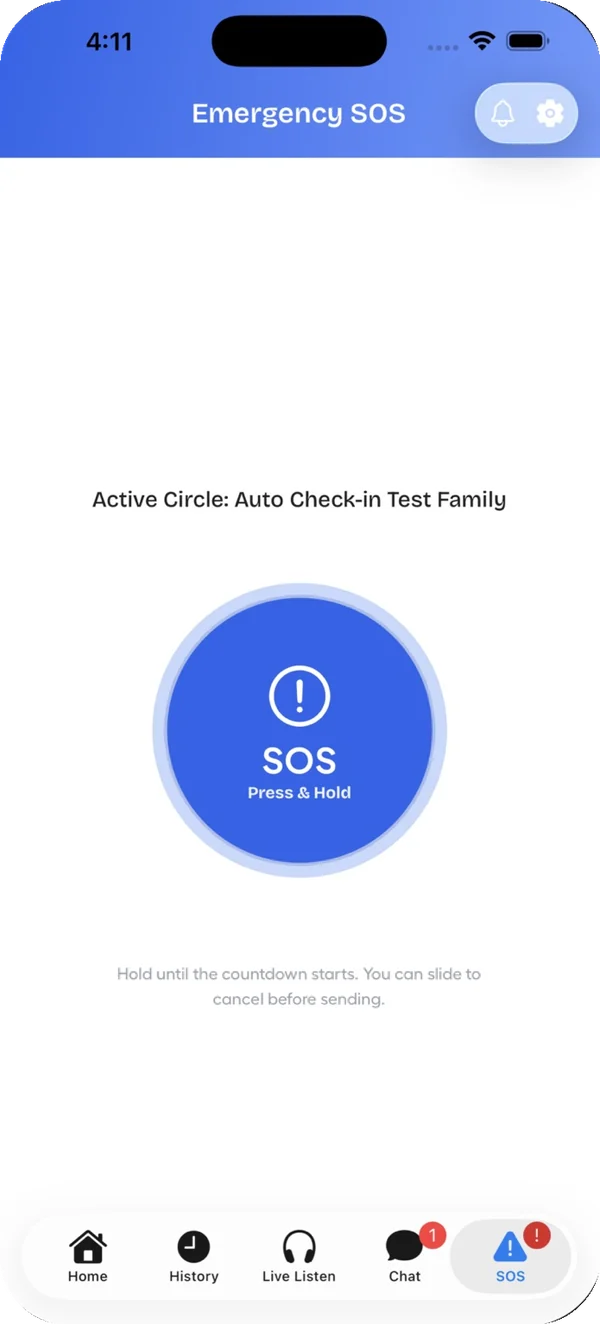 Life Guardian’s SOS screen. Hold the button, and slide to cancel during the countdown.
Life360 includes an SOS Help Alert on every plan, and its UK page lists emergency services dispatch on Gold and Platinum.
That’s an important difference. Life Guardian’s SOS alerts your Circle; it does not contact the police, ambulance or fire service. In any emergency, call 999 (or 112) first.
Driving
Life Guardian saves trips with route, distance, top and average speed, and events such as hard braking and rapid acceleration, which is useful when a teenager starts driving.
Life360 offers individual driver reports on Gold and Platinum. It also includes services Life Guardian doesn’t offer: breakdown assistance, free towing (limited on Gold, nationwide on Platinum) and stolen phone protection (up to £250 on Gold, £500 on Platinum), per its UK pricing page.
Staying in touch
Life Guardian puts communication next to the map:
- Circle chat with messages, voice notes and photos
- Audio and video calls with Circle members
- Quick Notes such as “Pick me up” or “Love you” in one tap
- Check-ins to let your Circle know you’ve arrived, with an optional photo
- Live Listen, which lets an approved member hear live audio from another member’s phone, only after that member has turned it on. Audio is live only and never recorded.
If your family already uses WhatsApp or iMessage for everything, these matter less. If you’d rather keep family safety in one place, they’re a real advantage.
Looking after older parents
Most family locator apps are designed around children. Life Guardian is built for every generation, and older parents are a core use case. Check-ins show where and when someone said they’re OK, and SOS reaches the whole Circle. Because only the Circle creator pays, a parent can join a Circle their adult child creates for free.
Life360 works for older relatives too, and its Platinum plan adds medical assistance and travel support. If those services matter to you, they’re worth the extra cost.
Where Life360 is stronger
- A free plan that lets you create a group. On Life Guardian, creating a Circle needs Premium.
- Bigger extras on paid tiers: breakdown assistance, towing, emergency dispatch, ID theft protection and stolen phone cover.
- Crash detection on every plan, listed on its UK pricing page.
- Pet features, including pet GPS devices on paid tiers.
- A long track record and a very large user base.
Where Life Guardian is stronger
- No ads and no data selling, with consent controls for every Circle.
- One simple price that unlocks everything, without choosing between tiers.
- Communication built in: chat, voice notes, audio and video calls, Quick Notes and consent-only Live Listen.
- Built for every generation, including older parents.
Which should you choose?
- Choose Life360 if you want a free way to share locations, or the extra services on Gold and Platinum: breakdown cover, emergency dispatch and identity protection.
- Choose Life Guardian if privacy is your priority, you want one clear price that covers the whole family, and you’d like chat, calls and check-ins in the same app as the map.
Frequently asked questions
Is Life Guardian free?
Life Guardian is free to download, and joining a Circle you’ve been invited to is free. Creating your own Circle needs Premium, which costs £4.99 a month or £49.99 a year in the UK.
Does Life Guardian sell location data?
No. Life Guardian does not sell personal data, including location, and shows no ads. Location is shared only with the members of each Circle you belong to.
Can my family use Life Guardian on iPhone and Android?
Yes. Families can mix iPhone and Android, and everyone appears on the same map.
Does Life Guardian call emergency services?
No. SOS alerts the members of your Circle with your location. In an emergency, always call 999 or 112.
Sources
- Life360 UK plans and pricing, checked 30 October 2026
- The Markup: Life360 is selling precise location data, 6 December 2021
- The Markup: Life360 says it will stop selling precise location data, 27 January 2022
- Life360: advertising platform announcement, 5 September 2024
- Life360: Place Ads announcement, 12 June 2025

Written by the team that builds Life Guardian 24/7. Features described here were checked in the app, and competitor details link to their source with the date we checked them.